Continuity planning
This page shows you how to use the Continuity dashboard to see how exposed your organization is when key people are away or leave, and how to fix the weakest spots.
Members with the Use Coverage and Manage Coverage permissions. Other members don't see the Continuity tab.
Open the dashboard
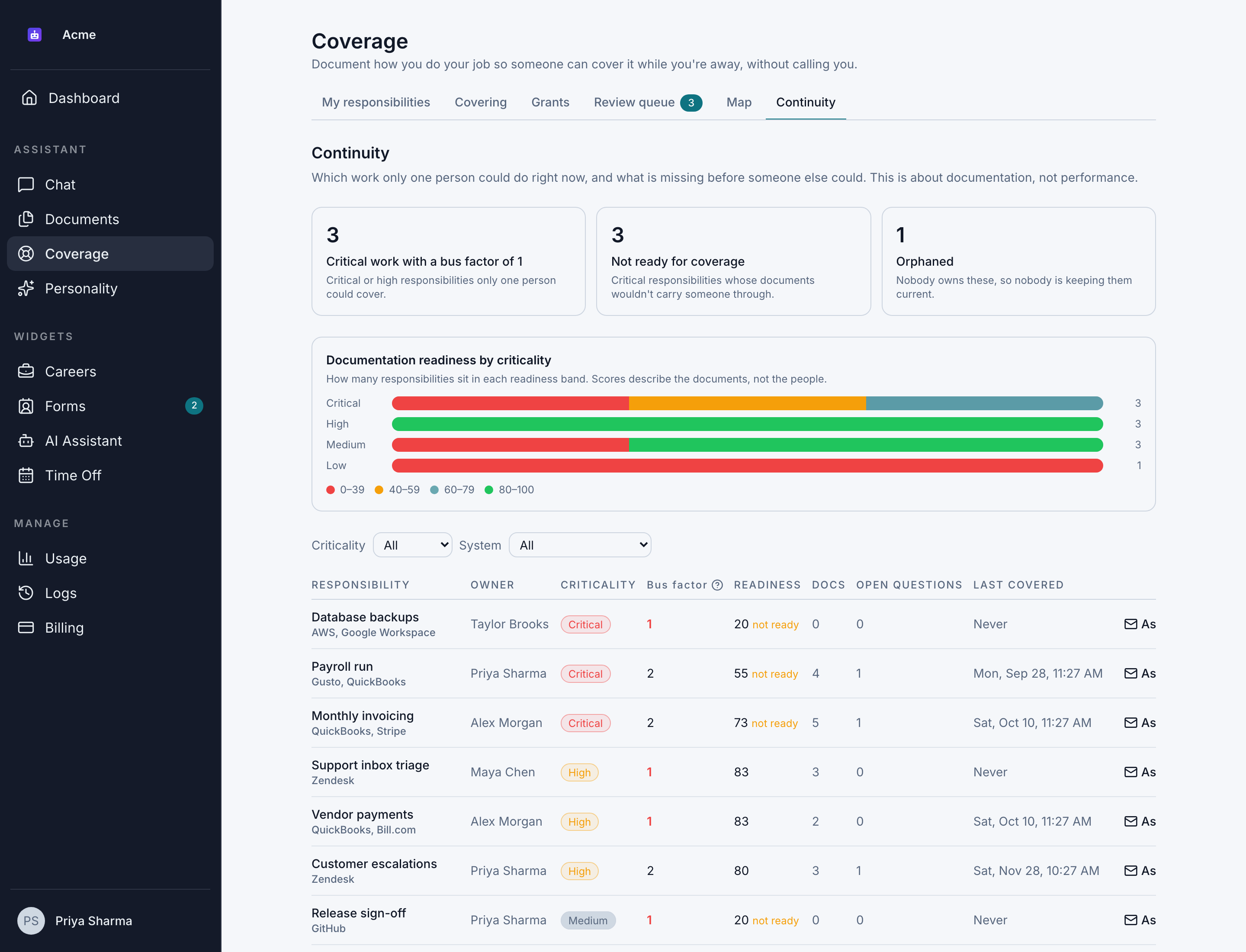
Go to Scheduling > Coverage > Continuity. It shows which work only one person could do right now, and what's missing before someone else could.
Everything on the dashboard describes documentation, not people or performance. Scores are shown per responsibility, never added up per person.
The summary
At the top, 3 numbers:
| Tile | What it counts |
|---|---|
| Critical work with a bus factor of 1 | Critical or High responsibilities that only one person could cover |
| Not ready for coverage | Critical responsibilities whose documents wouldn't carry someone through |
| Orphaned | Responsibilities with no owner, so nobody keeps them up to date |
Readiness by criticality
Documentation readiness by criticality shows how many responsibilities of each criticality fall into each readiness band: 0–39, 40–59, 60–79 and 80–100.
A responsibility's readiness score is out of 100:
- Half comes from having the right kinds of documents for its criticality.
- 30% comes from how recently they were published or verified.
- 20% comes from how few questions went unanswered during coverage.
It counts as ready at 60 for Low and Medium, 70 for High and 80 for Critical. See Readiness.
The responsibilities table
The table lists every responsibility, riskiest first. That means the most critical first, then those fewest people could cover, then the least documented.
| Column | What it shows |
|---|---|
| Responsibility | Its name and systems |
| Owner | Who owns it, or No owner |
| Criticality | Critical, High, Medium or Low |
| Bus factor | How many people could cover it today: the owner, plus anyone who covered it under an accepted grant and asked a question there in the last year. 1 means only one person, shown in red. |
| Readiness | Its score, marked "not ready" if it's below the threshold |
| Docs | How many published documents it has |
| Open questions | Questions delegates asked that its documents couldn't answer |
| Last covered | When someone last covered it, or Never |
Filter the table by Criticality or System.
Fix the weakest spots
Ask an owner to document their work
- Find the responsibility in the table.
- Click Ask owner to document. You see "Asked … to document …".
The owner gets an email, "This work has no backup documentation", saying you asked for the responsibility to be written down. It lists what would help, such as "Add a contact list", and has a Document it button.
You can ask about each responsibility once every 7 days. The email is about the work, not about the person.
Assign an owner to orphaned work
For a responsibility with No owner:
- Click Assign owner.
- In Who takes it on, choose a member with the Use Coverage permission.
- Click Start handover.
The responsibility moves to them straight away. See Transfer responsibilities.
Spread the knowledge
A bus factor only goes up when someone else actually covers the work. Plan real coverage for critical work, for example during the owner's next time off, so a second person learns it. See Grant coverage.
A suggested routine
We recommend checking continuity once a month:
- Look at the 3 summary tiles. Start with anything in Critical work with a bus factor of 1 or Orphaned.
- Assign owners to orphaned work.
- Click Ask owner to document for critical and high responsibilities that aren't ready.
- Check the Map for Single points of failure: groups of connected work that all depend on one person. See Coverage graph.
- Before busy holiday periods, check that critical responsibilities are ready and have a planned delegate.
Adjust the routine to how quickly your team changes.